Find the root cause first.
To200 reads the error, repo, and logs first, then writes a plan you can review.
How it works
Turn noisy failure data into root cause, plan, and confidence.
Read the evidence
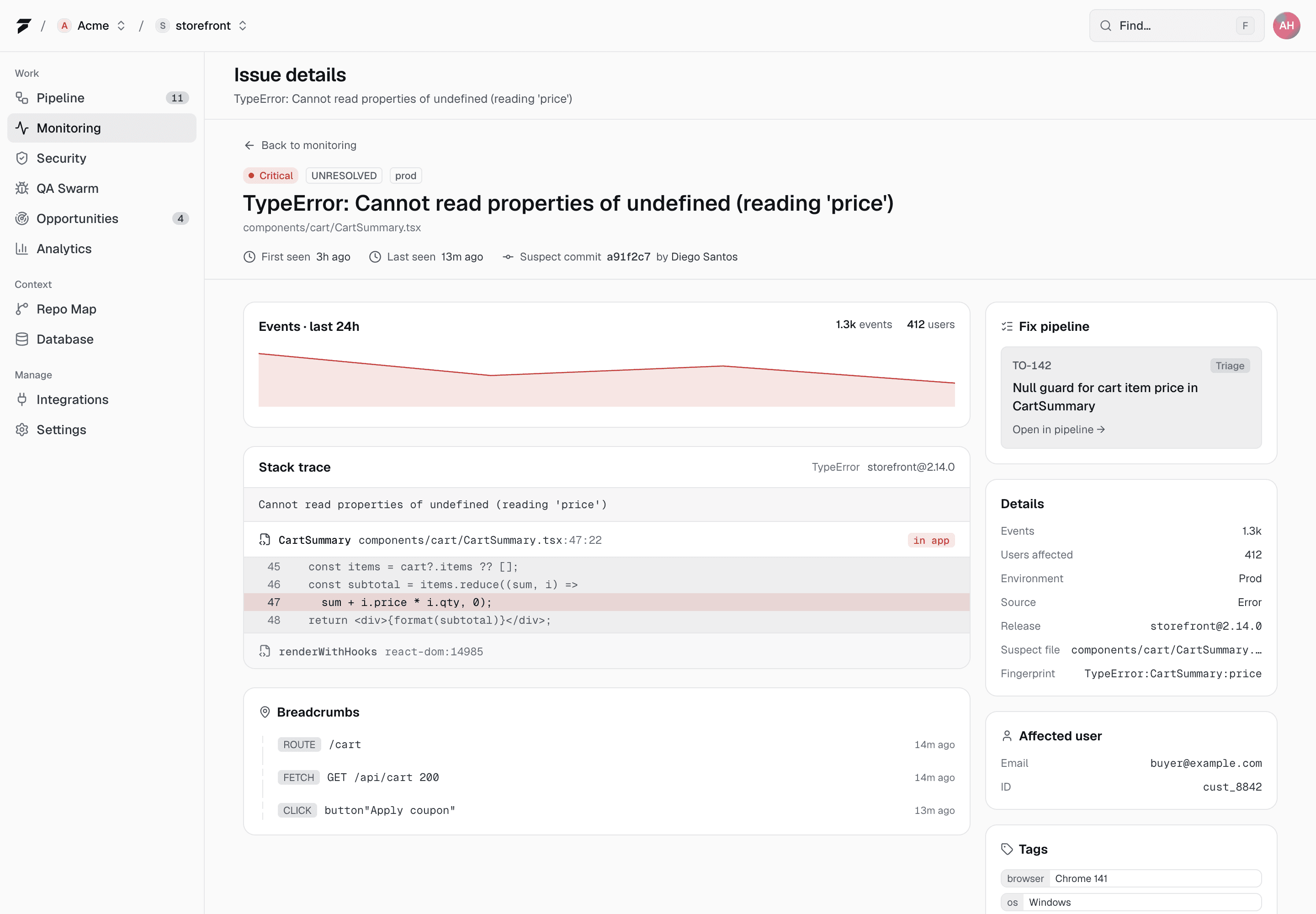
Stack traces, breadcrumbs, logs, commit metadata, and related files are loaded into one issue context.
Checkout throws when the session expires mid-flow: cart is read before the guard re-hydrates it. Fix belongs in the cart helper, not the route.
Find the likely cause
The AI separates symptoms from root cause and records its confidence.
Wait for policy
Project autonomy rules decide whether the AI can fix now or must wait for a stage change.
$ to200 triage TO-214
input logs + repo
output fix plan
gate policy check
✓ Check results attached to the PR
In practice
What triage answers
Why did this fail now?
Release, deployment, schema, and route context are considered together.
What files matter?
The repo map narrows likely files before the repair agent opens an editor.
How risky is the change?
Confidence, severity, and blast radius stay visible before work advances.
FAQ
Questions, answered.
Can engineers see why To200 chose a fix?
Yes. The assessment, plan, touched files, confidence, and verification result stay visible on the task.
Can it use official documentation?
Yes. The knowledge source bank points To200 at live provider documentation, so it can fetch current docs when needed.